A custom wheel brand was selling complex products through static images and standard Shopify product pages. The buyers had to imagine how products looked in their desired format; they had to guess the prices, beadlocks and the hardware. It was like putting hundreds of thousands of dollars on the line.
This article walks through how Techversol designed and built a real-time Shopify 3D wheel configurator using Three.js and Next.js that can make these choices visible, add to cart ready, priced and contributed to the estimated 10% increase in sales and lead generation in its first month.
Quick answer
A 3D wheel configurator is a browser-based tool that lets a customer customize a wheel part by part (center, inner rim, outer rim, cap), change finishes and colors in real time, see live pricing for every add-on, and send the exact configuration into the Shopify cart. Techversol built one supporting 300+ variations; the client reported an estimated 10% first-month lift in sales and lead generation.

Want A 3D Configurator That Lifts Sales ~10%?
Let customers customize their products live — it boosts engagement, builds buying confidence, and drives visible growth in sales.
The Problem: Static Product Pages Break Down For Custom Wheels

Custom wheels are not just a single SKU, but one product line can branch into hundreds of visual outcomes, as wheels can have multiple visual zones and each of them takes a different finish and colour. A standard Shopify product page is built around, say, a handful of photo variants, as they can’t show a shopper what specific build it needs to look like, even before they commit.
Why Real-Time Visualization Mattered Here
- The car wheel configurator needs distinct visual zones: inner and outer rims, center, center cap and each of them needs to be configurable on its own.
- Finishing behavior changes everything from matte, satin, metallic, gloss, transparent, and texture that looks differently in real light. A photo of one combination tells the buyer almost nothing about another.
- Say, for a premium purchase, customers need to see their exact combination even before paying, as this isn’t approximate from a reference shot.
- Sales teams need an accurate configuration of data to cut down on the back-and-forth clarification and speed up the quotes and processing.
The business cost needs to be measurable in friction: shoppers hesitate, sales rep burned, and confirm the visual price and choices on small things. The buying journey felt slower and less confident than a product deserved. The brand needed a digital experience that matched the quality of a car wheel configurator. A checkout flow that receives the configuration data accurately.
What is a 3D Wheel Configurator (And How Does It Work)?

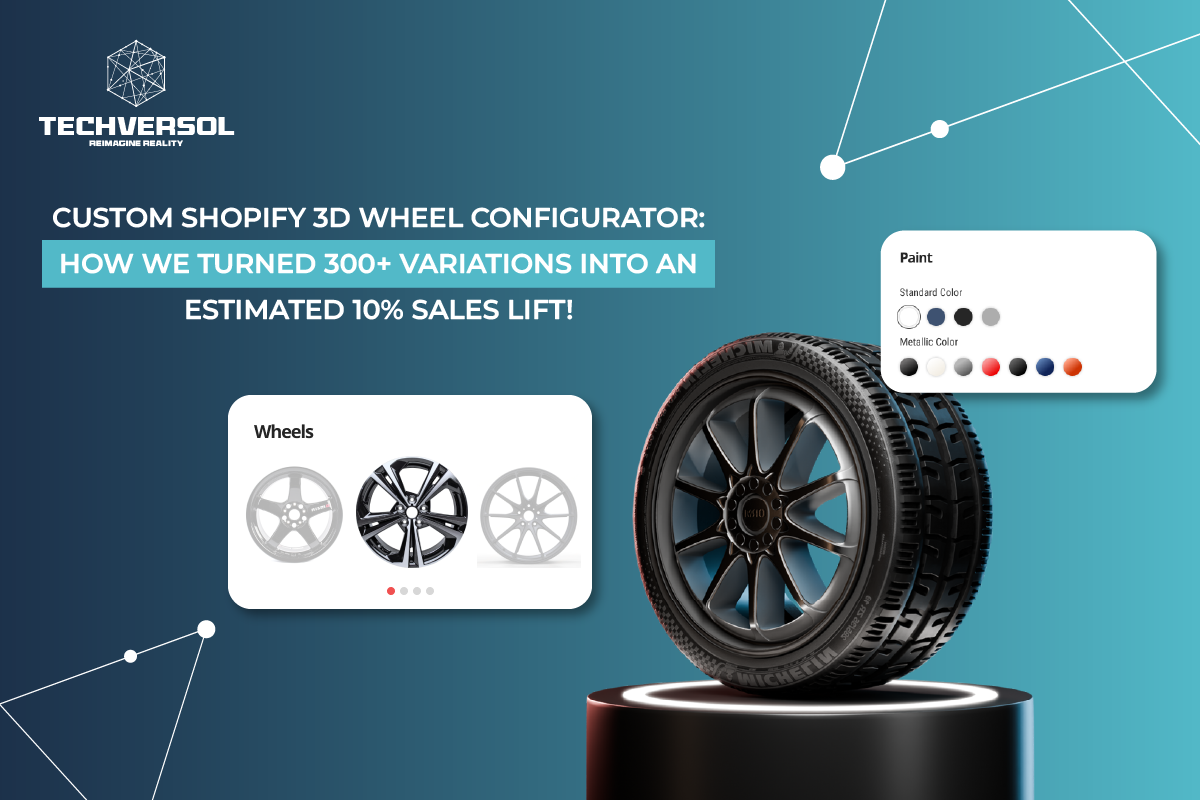
A 3D wheel configurator is an interactive tool embedded in an online store that renders a wheel as a real-time 3D model the customer can rotate, inspect, and customize part by part. As the shopper changes a finish, color, size, or add-on, the model updates instantly, the price recalculates, and the finished specification is passed into the cart so the order carries the exact build the customer designed.
So, under the hood, the three systems have to stay in sync: the visual state (what the configurator shows), pricing state (what every selection costs) and the commerce state (what reaches the Shopify cart). It’s like getting these to agree reliably across mobile and desktop. The real engineering challenge is where most of the off-the-shelf configurator apps can fall short.
Project Goals
- Create a premium, real-time best wheel configurator for custom wheels.
- Support at least 300 product variations with dynamic sizing, texture and colours.
- Let users customize wheel parts such as inner rim, center cap and outer rim.
- Supporting finish categories like gloss, matte and satin with correct material behavior.
- Calculate and display the pricing from already selected fields such as hardware, caps, beadlocks, and other add-ons.
- Capture the configuration details for the customer, sales team, checkout and quoting.
- Build a system inside Shopify through a custom app, as there’s no separate admin panel to maintain.
- Deliver a fully responsive experience across the desktop and mobile.
Losing sales to “I can’t picture it”?
Let customers spin every option in 3D.
The Solution: A Custom Shopify App That Embeds the Car 3D Configurator
Instead of forcing a rigid third-party plugin in a non-standard catalogue, Techversol built a custom Shopify app that embeds the responsive Next.js and Three.js configurator into the store. The app connects the 3D visualization, price-driven options and dynamic product logic to Shopify add to cart in a single flow. So, what customers see, and what they quote and buy can all stay aligned.

Core solution
A custom Shopify app embeds a responsive Next.js + Three.js configurator into the store, connecting real-time 3D visualization, dynamic product logic, price-driven options, and Shopify add-to-cart into one experience, with no separate admin panel required.
What The Best Wheel Configurator Does
- Real-time 3D wheel visualization with interactive models you can freely view and rotate.
- Separate customization tabs for inner rim, center cap, outer rim and a summary view.
- Finishing selection across matte and satin, with material behavior per finish.
- The colour selection for the car 3D configurator is driven by the custom material and the texture logic.
- Copy function to apply finish and colour settings across the related wheel parts in just one step.
- The live per-wheel pricing has upcharges visible before checkout.
- A responsive interface tuned for mobile and desktop.
The 3D Configurator Wheels Customer Journey, Step By Step
| Step | Stage | What happens |
| 1 | Select product | Customer opens a wheel product and enters the configurator from the Shopify product page. |
| 2 | Customize parts | They configure center, inner rim, outer rim, cap, finishes, colors, sizing, hardware, and beadlocks. |
| 3 | Preview in 3D | The wheel updates visually so combinations can be compared before checkout. |
| 4 | Review pricing | Per-wheel pricing and upcharges update from the selected options. |
| 5 | Add to cart | The configured product enters the Shopify cart with all price-driven fields captured. |
| 6 | Sales support | The sales team receives clearer configuration data for faster follow-up and order handling. |
Technical Implementation: Making Visuals, Pricing, And Cart Agree
The project combined web development, real-time 3D, material handling, and custom 3D production. The objective was not just to render a wheel, but it was to make the visual state, pricing state, and Shopify cart state behave as a coherent system.
The 3D Configurator Wheels And Material Pipeline
- 3D configurator wheel assets were modelled to match the real product line rather than reused from generic libraries.
- Models were optimized for browser rendering while preserving a premium look, so the experience stayed fast without looking cheap.
- Different UV layouts and texture behaviors were handled per model, because a single material approach is unreliable across varied geometry.
- Materials were configured so gloss, matte, satin, metallic, transparent, and custom colors all read convincingly in real time.
- The 3D asset pipeline was coordinated directly with the developer, so visual behavior and data behaviour stayed in lockstep throughout the build.
The Shopify And Pricing Layer
For the commerce side, the 3D configurator product needs to map the visual choices — colour, beadlocks, caps and other hardware add-ons — to price-driven options. It writes the complete configuration in the cart. The build is captured as structured data instead of a free text note; the sales team can read exactly what the customer has specified, and fulfilment knows precisely how to make it.
Major 3D Configurator Product Challenges And How Techversol Solved Them
| Challenge | Why it was hard | How we solved it |
| Large variation count | 300+ wheels with different models, sizing, finishes, colors, and price rules. | Structured dynamic data handling so the correct model, options, and price fields load per configuration. |
| 3D object loading | Multiple assets and textures risked a slow, heavy experience. | Optimized model and texture handling for smoother performance across desktop and mobile. |
| Different UV layouts | Varied geometry needed different texture and material treatment. | Prepared models and materials so finishes mapped correctly to each configurable part. |
| Realistic finishes | Believable gloss, matte, satin, metallic, and transparent looks in real time. | Balanced material quality against web performance so previews stayed light. |
| Shopify pricing | Visual choices had to drive real price options and cart data. | Mapped every selection into the purchase flow so the final build was captured accurately. |
Results And Business Impact
Right after the launch, the Shopify 3D wheel builder turned a static browsing flow into an interactive buying journey. Customers need to see what they are building, understand the price as they build it, and submit a purchase-ready configuration with less ambiguity.
Reported First-Month Impact
The client reported an estimated 10% increase in sales and lead generation within the first month after launch. This figure is a client estimate rather than an independently audited result.
Business Outcomes
- Higher engagement with premium wheel products, as shoppers experimented with combinations.
- Clearer visualization of finish, color, and part combinations before purchase.
- More confidence at checkout and less uncertainty around custom orders.
- Better configuration data for the sales team, and improved lead quality because preferences were captured directly.
- Stronger marketing value from an interactive, shareable product experience.
- A fully responsive mobile experience for customers browsing on phones.
Why It Lifted Sales And Lead Generation
The configurator can work as a sales and marketing tool at the same time. It keeps the users engaged, invites them to try the combination, and removes the uncertainty that can shadow a custom automotive purchase. The price-driven fields are captured in the configuration; the sales team follows up with context instead of starting a discovery from scratch. It shortens the path from interest to order.
Where The Impact Showed Up
The value didn’t just land in one place it spread across five parts of the business. That’s where a configurator pays back faster than any single-metric view would suggest.
- Customer Experience: a premium, interactive buying journey inside Shopify
- Sales Enablement: clear configuration details for follow-up, quotes and order processing.
- Marketing: A visual product experience that invites exploration and social-style sharing.
- Ecommerce: the configured products can move straight into the cart with pricing and selections attached.
- Operations: It has less ambiguity about what the customers chose and what needs to be filled.
Who Needs A 3D Product Configurator?

A configurator can earn its keep when we see a product being highly customizable, variable, and visually priced high enough that buyers want certain options even before they commit. Wheels are a clear fit; it’s the same pattern that is applied across various categories.
- Automotive and aftermarket parts: rims, wheels, accessories, and hardware options.
- Furniture and cabinetry: where material, color, dimension and combinations can multiply.
- Metal, stone, jewelry, watches, and engraving should be considered for both look and price.
- Industrial and medical equipment, where configuration accuracy can affect the fulfilment and quoting.
- The premium made-to-order product where a photo can’t represent a valid combination.
How Long Does It Take, And What Does A Build Like This Involve?
For this project, the engagement needs to run for about 12 weeks across product data handling, 3D assets, testing, creation and launch readiness. The core configurator can come together in, say, about two weeks.
The team was deliberately lean: one developer and one 3D artist working in close collaboration, as there’s no separate admin panel, because the configurator logic was handled through the custom Shopify app product and data flow.
| Delivery detail | Summary |
| Total timeline | About 12 weeks, data handling through launch readiness |
| Core configurator build | Approximately 2 weeks |
| Team size | 1 developer and 1 3D artist |
| Delivery model | Lean execution with direct dev and 3D collaboration |
| Admin panel | Not included; logic handled via custom Shopify app and product data |
Timelines vary with catalog size, the state of your 3D assets, and how much pricing logic is involved. A single hero product with clean models moves fast; a 300-variation catalog with mixed geometry takes the kind of data structuring described above.