Skip to content

According to a study by Forrester, 3D product configurators can increase conversion rates by up to 40%.
A 3D product configurator is an advanced digital tool that empowers businesses to offer a fully interactive and personalized shopping experience. Whether you’re selling customizable products like furniture, fashion items, or even high-end electronics, a 3D configurator can help your customers visualize their personalized selections in real time.
In this guide, we will walk you through the entire process of building a 3D product configurator—from planning and design to development and optimization—so that you can enhance the shopping experience and increase conversion rates.
What is a 3D Product Configurator?
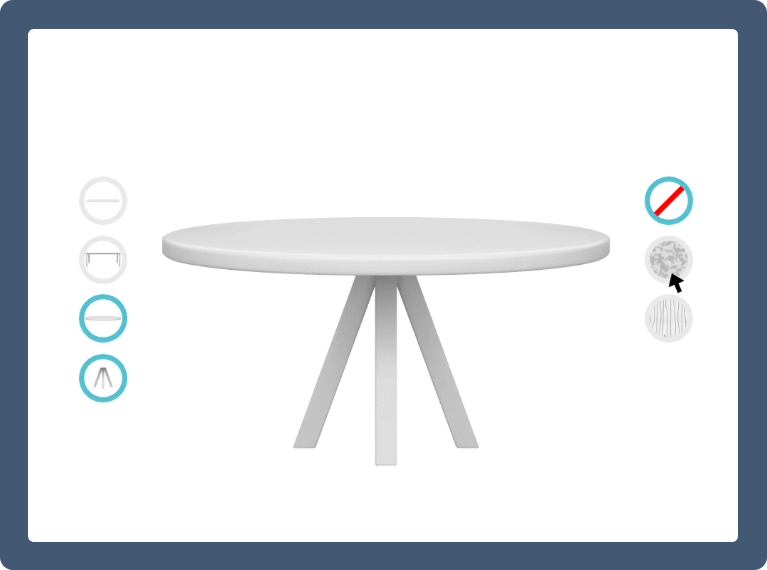
A 3D product configurator is an interactive tool that allows customers to modify and visualize a product in three dimensions. This tool enables users to make custom selections—like changing the color, size, and features—while seeing these changes applied in real time. By integrating a product configurator into your online store or app, you can create a personalized shopping experience that can boost engagement, reduce returns, and ultimately drive sales.
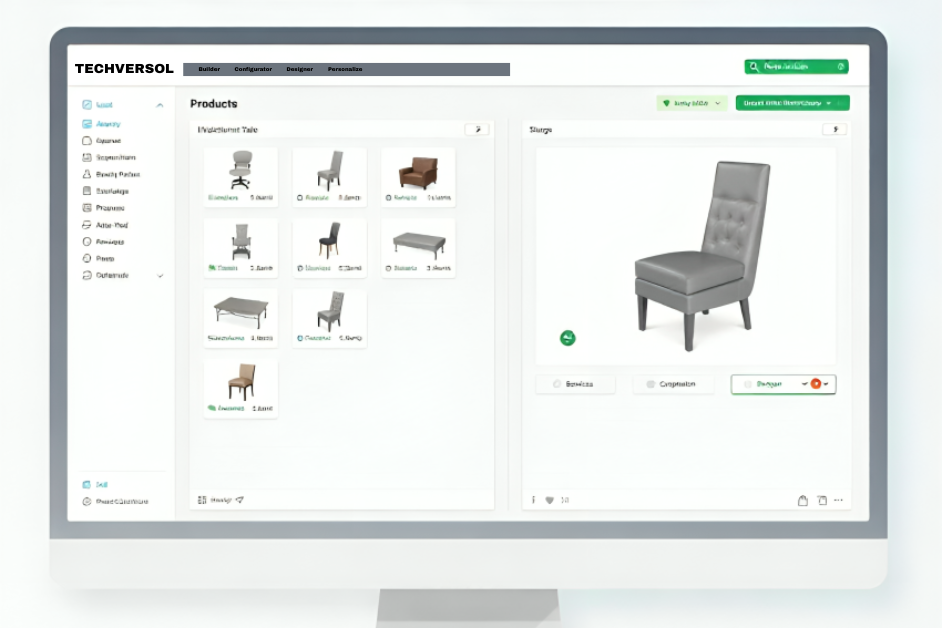
This interactive 3D product configurator showcases real-time customization, offering users an immersive experience to visualize products. It highlights Techversol’s expertise in creating dynamic and engaging digital solutions.
The Importance of a 3D Product Configurator for Your Business
A 3D product configurator helps bridge the gap between online shopping and the real-world experience of shopping in a physical store. Customers gain confidence in their purchase decisions when they can see and interact with a digital version of the product they want to buy. For industries like furniture, jewelry, and fashion, a product configurator allows shoppers to visualize how different configurations will look, giving them more control over the final product and increasing the likelihood of a sale.
Defining Goals and Objectives
Before diving into development, it’s crucial to define your objectives. Ask yourself questions like:
- Do you want to enhance customer satisfaction?
- Are you aiming to reduce product returns?
- Do you want to increase the average order value by encouraging customers to customize their purchases?
Clearly outlining your goals will help guide your decisions throughout the development process, ensuring the configurator meets both business and customer needs.

Bring Your Products to Life with a Custom Configurator!
Analyzing Your Audience for Better Customization
Understanding your audience is key to designing a successful 3D product configurator. For example, if you’re selling high-end custom furniture, your audience will likely expect a more detailed and sophisticated configurator with options to adjust material types, dimensions, and finishes. On the other hand, a simpler product like custom T-shirts may require fewer customization options but still benefit from an easy-to-use and visually appealing 3D configurator.
Key Features to Incorporate in Your 3D Product Configurator
Real-time Visualization
Real-time visualization allows customers to instantly see how their choices affect the product’s appearance, which can significantly enhance the user experience.
Customization Options
Offer a range of customization choices, including colors, textures, sizes, and additional features. The more options you provide, the more engaged your customers will be.
Price Calculation
Integrating a dynamic pricing engine ensures that customers see an updated price based on the modifications they make. This can help reduce cart abandonment by providing full transparency.
3D Rotation and Zoom
Allow customers to rotate and zoom in on the 3D model of their product to view it from every angle. This helps them make more informed purchasing decisions.
Save and Share Functionality
Enable users to save their customized products and share them with friends or on social media. This not only enhances the user experience but also serves as an effective marketing tool.
Bring Your Products to Life with a Custom Configurator!
Designing the User Interface (UI) and User Experience (UX)
Wireframing and Mockups

Start by designing wireframes and mockups to visualize the layout and functionality of your 3D product configurator. Tools like Sketch, Figma, and Adobe XD can help you design user-friendly interfaces.
Interactive Elements and Responsiveness
Ensure that interactive elements like buttons, sliders, and drop-down menus are easy to use and responsive. A user-friendly interface encourages users to engage with the configurator for longer periods.
Designing for Multiple Devices
With mobile shopping on the rise, it’s essential to design your configurator to be responsive across all devices—whether desktop, tablet, or smartphone.
Creating Detailed 3D Models for Your Product Configurator
Tools for 3D Model Creation
The foundation of any good 3D product configurator is detailed, high-quality 3D models. Use industry-standard software like Blender, Autodesk 3ds Max, or Maya to create realistic models that capture the essence of your products.
Textures and Materials for Realism
Adding textures and materials to your 3D models enhances realism. Whether it’s wood grain, fabric texture, or metal shine, these elements will make the configurator more immersive for your customers.
Exporting 3D Models for Compatibility
Ensure that the 3D models are compatible with the development platform you choose. Formats like OBJ, FBX, and glTF are widely used for 3D product configurators.
Choosing the Right Development Platform for Your Configurator
WebGL and Three.js
WebGL and Three.js are powerful tools for building 3D configurators for web-based platforms. Three.js is a JavaScript library that simplifies working with WebGL and allows for smooth, interactive 3D experiences in browsers. These tools help ensure your 3D product configurator is highly accessible across different web platforms while providing rich, responsive user experiences.
Unity 3D
Unity 3D is ideal for creating 3D product configurators that work across both web and mobile app platforms. It offers a range of powerful features like physics, real-time rendering, and compatibility with various devices, making it a great choice for developing sophisticated 3D experiences. Unity also has built-in support for AR/VR, which could be an added bonus depending on your product.
Unreal Engine
Unreal Engine is known for its exceptional graphical rendering capabilities, making it an excellent choice for high-end 3D product configurators that require top-notch visual quality. While it has a steeper learning curve, its Unreal Engine’s photorealistic rendering power makes it the preferred choice for industries like luxury goods, automotive, or fashion, where the visual appearance of the product is crucial.
Integrating Core Functionalities in Your 3D Product Configurator
Product Customization
The primary purpose of a 3D product configurator is to allow users to modify and personalize products. This feature should be simple to use, visually engaging, and streamlined. Whether it’s adjusting the color of a sneaker, changing the material of a chair, or adding custom engraving to jewelry, your configurator should enable users to create their perfect product with ease.
Real-Time Updates
One of the main attractions of a 3D product configurator is real-time updates. As users adjust their selections, changes should be immediately reflected in the 3D model. This real-time interaction enhances the sense of control and personalization, increasing user satisfaction and engagement.
Price Calculation Engine
A dynamic pricing engine is essential for providing users with real-time pricing based on their customizations. Integrating this feature into your configurator ensures that customers can make informed purchasing decisions without unexpected surprises at checkout. This helps mitigate cart abandonment and improves conversion rates, leading to increased sales.
Optimizing Performance and Speed of Your 3D Product Configurator
Reducing Load Times
Slow loading times can have a significant negative impact on the user experience and conversion rates. According to a study by Google, 53% of mobile users will abandon a website if it takes more than 3 seconds to load. Therefore, optimizing your 3D models and textures is crucial. Compress your models without sacrificing too much detail and use modern web optimization techniques like lazy loading to ensure the configurator loads quickly.
Efficient Rendering Techniques
Efficient rendering techniques like Level of Detail (LOD) can be used to reduce the load on the system and improve performance. LOD ensures that only the parts of the model visible to the user are rendered in high detail, while parts out of sight are displayed with lower detail, saving resources and improving speed.
Enhance Performance and Efficiency with Advanced Rendering Solutions!
Testing Your Configurator for Performance and Compatibility
Cross-Browser and Cross-Device Testing
It’s essential to thoroughly test your 3D product configurator on different browsers (Chrome, Firefox, Safari) and devices (mobile phones, tablets, desktop computers). Each browser may render 3D models differently, and user interactions may vary depending on the platform. Ensuring compatibility across a range of devices and browsers is key to providing a seamless experience for all customers.
User Interaction Testing
Perform extensive user interaction testing to ensure the configurator is intuitive and user-friendly. This includes evaluating interactive elements like sliders, buttons, and customization options. Gathering feedback from real users during the testing phase will allow you to make improvements that enhance usability and satisfaction.
Integrating Backend Systems for Smooth Operation
Inventory and Pricing Integration
A 3D product configurator should be fully integrated with your backend systems to provide real-time inventory updates and accurate pricing. This ensures that customers only see options that are in stock and that pricing adjusts dynamically based on their customizations.
User Authentication and Personalization
If needed, integrate user authentication systems into your 3D product configurator. Allow customers to save their personalized configurations for later, share them, or purchase them in the future. Personalization features can increase customer loyalty and repeat purchases.
Use Case Studies: Real-World Examples of 3D Product Configurators
- Nike: Nike’s customizable sneakers are one of the best examples of a 3D product configurator in action. Customers can select colors, materials, and even add custom text to their shoes while viewing the changes in real-time.
- Ikea: Ikea offers an interactive 3D configurator for their furniture, allowing customers to visualize how different pieces will fit in their spaces.
- Tesla: Tesla’s car configurator allows users to select various car models, colors, wheels, and interior finishes, providing a 360-degree interactive view of their vehicle in real-time.
These examples illustrate how a product configurator can provide a more engaging, personalized shopping experience, ultimately leading to increased sales.
Focus on ROI: Maximizing Returns with a 3D Configurator
Investing in a 3D product configurator can yield significant returns, not only by boosting sales but also by improving customer retention. According to a study by Forrester, product configurators can increase conversion rates by up to 40%. Additionally, they help reduce product returns by providing customers with a clearer understanding of what they’re buying. A survey by Statista showed that 35% of consumers are more likely to buy a product online if they can customize it through an interactive tool.
By improving customer satisfaction, increasing average order values, and reducing cart abandonment, a 3D product configurator can have a direct positive impact on your bottom line.
Conclusion
Building and integrating a 3D product configurator is an investment that can provide significant returns. By offering your customers a fully interactive and personalized shopping experience, you enhance their satisfaction and increase your sales potential. Remember, the key to a successful product configurator lies in its seamless integration, ease of use, and ability to meet both business goals and customer expectations.
Investing in the right tools, technology, and expertise will help your business create a cutting-edge 3D product configurator that not only delights customers but also drives sales and enhances brand loyalty.